
Too Long? Read This in 10 Seconds
Executive bullet points for fast decision-making
- ✓ A QR code without a crystal-clear customer incentive gets ignored; offer instant value like a ₹200 voucher, free Wi-Fi, or digital VIP club access.
- ✓ At billing counters and dining tables (30–50 cm reading distance), the QR code must be printed at a minimum of 4.5 to 5 cm with a 4-module quiet zone.
- ✓ Always print on 300+ GSM matte cardstock; glossy laminate creates overhead spotlight reflections that blind phone camera sensors.
- ✓ Use trackable UTM promoter links for each counter desk or staff member to reward top-performing sales reps who drive check-ins.
- ✓ Clear acrylic L-shaped or T-shaped holders protect your printed inserts from coffee spills, fingerprints, and counter grease.
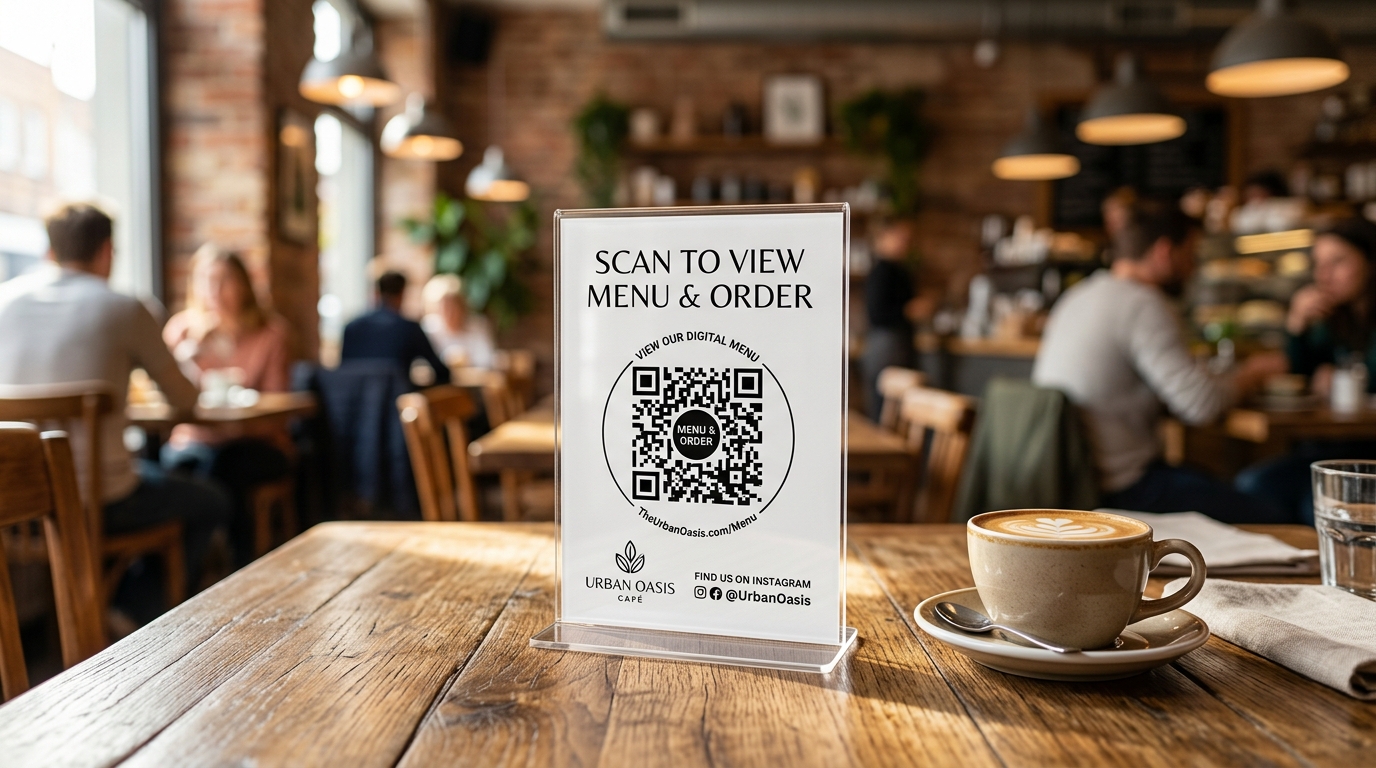
 Figure 1: A well-placed acrylic table tent on a dining table with a high-contrast QR code and clear customer incentive.
Walking into a retail store or restaurant today, you will find QR codes taped to walls, printed on flimsy paper slips, or taped awkwardly to credit card swipe machines.
Most of them get zero scans. Why? Because they lack three critical ingredients:
- A compelling reason to scan (incentive hook).
- Proper physical dimensions and contrast (readability).
- An elegant presentation that fits the establishment's decor.
When designed correctly, a Counter QR Standee or Table Tent Card converts between 25% and 48% of total store footfall into opt-in WhatsApp contacts.
Here is the complete engineering and design playbook for setting up high-converting QR standees in retail showrooms, clinics, salons, and hospitality venues.
The Anatomy of a High-Converting Counter Standee#
Before sending artwork to your commercial printer, review this 5-part anatomical checklist:
┌──────────────────────────────────────────────┐
│  [ STORE LOGO ]                              │
│                                              │
│  ⭐ JOIN OUR VIP CLUB                        │
│  Get ₹200 off your bill today                │
│                                              │
│        ┌─────────────────────────┐           │
│        │  ████████   ██   ██████ │           │
│        │  ██    ██   ██   ██  ██ │           │
│        │  ████████   ██   ██████ │           │
│        │        ██   ██          │           │
│        │  ████  ███████   ██████ │           │
│        │  ██    ██   ██   ██  ██ │           │
│        │  ████████   ██   ██  ██ │           │
│        └─────────────────────────┘           │
│           [ 4-Module Quiet Zone ]            │
│                                              │
│  📱 Scan with camera · 10 seconds check-in   │
│  No app download required                    │
│  Instant voucher sent to your WhatsApp       │
│                                              │
│  📍 Billing Counter A · Desk #2              │
└──────────────────────────────────────────────┘
1. High-Trust Brand Header#
Feature your high-res logo with clean breathing room. An unbranded QR code feels suspicious to modern consumers concerned about cybersecurity and phishing.
2. The Incentive Hook (The "What's in it for me?")#
Never print "Scan for more info" or "Visit our website". Nobody stops at a billing counter to browse an "About Us" page.
- Retail Showrooms: "Scan for ₹500 off your festive purchase today"
- Restaurants & Cafes: "Scan for complimentary dessert & Chef's secret menu"
- Clinics & Wellness: "Scan for high-speed clinic Wi-Fi & preventive health checklist"
- Salons & Spas: "Scan for loyalty stamps & 20% off your next styling"
3. The Central Vector QR Code#
The QR code must be generated as a vector (SVG/PDF). Avoid raster images (JPEG/PNG) that become pixelated and blurry when scaled up.
4. Zero-Friction Reassurance#
Remind customers that scanning is effortless: "Scan with phone camera · No app required · Takes 10 seconds".
5. Micro-Attribution Footnote#
A small code in the bottom corner (e.g., Counter-A or Staff-Rahul) makes the card trackable without cluttering the visual hierarchy.
Sizing Matrix: Viewing Distance vs Print Dimensions#
Printing a QR code too small is the single most common reason offline check-in funnels fail.
| Location | Viewing Distance | Recommended Card Size | Minimum QR Code Width | Recommended Standee Type |
|---|---|---|---|---|
| Billing Counter / Cashier | 30–45 cm (Arm's reach) | A6 (105 × 148 mm) | 4.5 cm (1.75 in) | Slanted L-shape acrylic |
| Restaurant Dining Table | 40–60 cm | A5 (148 × 210 mm) | 5.0 cm (2.0 in) | Dual-sided vertical T-shape |
| Clinic Reception Counter | 50–70 cm | A5 (148 × 210 mm) | 6.0 cm (2.35 in) | Premium wood-base acrylic |
| Showroom Entrance Easel | 1.0–1.5 meters | A4 (210 × 297 mm) | 10.0 cm (4.0 in) | Framed pedestal floor stand |
| Storefront Window Glass | 1.5–2.5 meters | A3 (297 × 420 mm) | 18.0 cm (7.0 in) | Static cling window decal |
The 10:1 Sizing Rule: As a rule of thumb, the scanning distance divided by 10 equals the minimum width of your QR code. If a customer is scanning from 50 cm away, the code itself must be at least 5 cm wide.
Paper, Coating & Material Selection#
The material your standee is printed on matters as much as the graphic design:
1. Paper Weight (GSM)#
Always choose 350 GSM or 400 GSM art card. Flimsy 120–150 GSM office paper curls, wrinkles, and slides down inside acrylic holders after a few days of air-conditioned showroom moisture.
2. Matte Finish vs Gloss Laminate (Crucial)#
- ❌ Gloss Laminate: Highly reflective. In stores with overhead LED downlights or track spotlights, gloss laminate reflects glare directly into the phone's camera lens, making QR detection impossible.
- ✅ Matte Soft-Touch Finish: Absorbs ambient spotlighting and ensures instantaneous QR decoding from any angle.
3. Acrylic Standee Holders#
Never leave cardstock standing unsupported on a counter where it can be knocked over or splashed.
- L-Shaped Slanted Standees: Best for checkout counters where the customer is standing and looking downward at a 45-degree angle.
- T-Shaped Vertical Standees: Best for dining tables where guests sit on opposite sides and can view the dual-sided print.
Tracking Staff & Desk Attribution with UTM Shortlinks#
In high-volume retail stores, you want to know which sales rep, promoter, or billing counter is actively encouraging customer check-ins.
With Swift Inbox, you do not need to print different forms. You simply generate Trackable Staff Links inside the Visitor Hub:
https://swiftinbox.io/v/amber-showroom?utm_source=staff&utm_medium=counter_a&utm_campaign=rahul
graph LR
    A[Counter Desk A - Rahul] -->|Scan QR #1| E[Swift Inbox Analytics]
    B[Counter Desk B - Priya] -->|Scan QR #2| E
    C[Table #14 - Dining] -->|Scan QR #3| E
    D[Promoter - Field Booth] -->|Scan QR #4| E

    E --> F[Performance Ledger]
    F --> G[Staff Leaderboard & Incentives]
Benefits of Staff Attribution:#
- Gamified Staff Motivation: Run internal contests (e.g., "Sales rep with the most verified customer check-ins wins a ₹2,000 monthly bonus").
- Dead Zone Discovery: Identify tables or counters that generate zero scans and reposition the standees to higher-traffic areas.
- Audience Segmentation: Visitors who register through a promoter link can be segmented into a specialized WhatsApp broadcast list for targeted event promotions.
4 Common QR Standee Mistakes to Avoid#
- Placing Standees Behind Counter Obstructions: If your QR card is hidden behind barcode scanners, receipt printers, or promotional candy jars, customers will never see it. Keep the standee within 15 cm of the payment terminal.
- Missing Quiet Zones: Every QR code requires a blank white margin (the "quiet zone") equal to at least 4 modules of the code grid. Running text or border graphics too close to the black dots prevents scanner recognition.
- Inverting Colors: White QR codes on dark background boxes scan poorly on older Android devices. Stick with high-contrast dark codes on a light background.
- Broken Links After Number Porting: When you encode raw phone links, changing your number invalidates all printed cards. Swift Inbox uses permanent hosted redirect slugs (
/v/{slug}), meaning you can change settings, WhatsApp numbers, or welcome voucher messages without reprinting a single standee.
Summary#
A counter QR standee is your store's 24/7 frontline digital greeter. Invest in high-GSM matte cardstock, encase it in a clean acrylic holder, state an undeniable incentive, and watch your showroom walk-ins convert into verified, repeat WhatsApp customers.
Frequently asked questions
What size should a counter QR standee be? +
For billing counters and dining tables scanned from arm's length (30–50 cm), an A6 (4 × 6 inch) or A5 (6 × 8 inch) card with a 4.5 to 5 cm QR code is the gold standard.
Why do some customers fail to scan printed QR codes? +
The most common culprits are overhead glare on glossy laminate, insufficient contrast (such as light gray on white), and printing the code smaller than 3.5 cm.
Can I track which staff member or table generated the scan? +
Yes. Swift Inbox lets you create unique Trackable Staff Links with embedded UTM attribution, so each promoter, cashier, or table gets its own QR code.
What is the best material for counter standees? +
Premium 350 GSM matte cardstock encased inside a sturdy, scratch-resistant acrylic holder offers the best balance of aesthetics, scan reliability, and durability.